
Project Zomboid × LibertyTalk: Talky
A Twitch follow spawns a zombie named after the follower, 300 bits send three of them, a channel points reward calls in the helicopter. Part 1: install the Talky mod and its bridge. Part 2: understand the workflows that connect your streams to the game.
- Level Intermediate
- 45 min read
- Updated October 30, 2026
- Available languages FR · EN
Talky connects your Twitch and YouTube events to your Project Zomboid game. When Bob follows your channel, a banner announces him and, two seconds later, a zombie appears about ten tiles from your character, with "Bob" written in purple above its head. Talky has two pieces: a mod for the game and a small program, the bridge, that runs on your PC.
- Trigger
Twitch follow
Bob follows your channel.
- Action
LibertyTalk widget
Sends
{"user_name":"Bob"}to your bridge's address. - Outside LibertyTalk
cloudflared tunnel
Makes the bridge reachable from the Internet.
- Outside LibertyTalk
Talky bridge
Runs the
new_followerworkflow and drops the actions for the game. - Outside LibertyTalk
Talky mod
Shows the banner, then spawns the named zombie.
Why a bridge? Project Zomboid's Lua can't receive network calls: it can only read and write files in %USERPROFILE%\Zomboid\Lua. The bridge receives LibertyTalk's calls on http://127.0.0.1:7420 and writes the actions into that folder, which the mod reads every second.
Part 1 installs Talky and connects it to LibertyTalk with the official widget. Part 2 explains the workflows on both sides, so you can change what happens in the game when a viewer cheers 500 bits.
Good to know
Tested version
Talky 0.5.0 works in single player and on a server (part 3). It has been tested in a real game on Build 42.21, in single player and on a dedicated server: follows, chat commands, bits, names above zombies, helicopter and weather.
Turn on Talky in Project Zomboid
Install the mod and the bridge, test without LibertyTalk, open the tunnel, then plug in the official widget.
What you need
- Windows 10 or 11.
- Project Zomboid Build 42, version 42.20.1 or later. This part covers single player; for a server, see part 3.
- Node.js version 18 or later, to run the bridge.
- cloudflared, Cloudflare's tool that gives the bridge a public address.
- A LibertyTalk account with your Twitch or YouTube channel connected to your community.
Node.js and cloudflared install with two commands in a PowerShell terminal:
winget install OpenJS.NodeJS.LTS
winget install --id Cloudflare.cloudflarednode and cloudflared commands are recognised.Get Talky
You can download Talky from two places. The Steam Workshop ships the mod only: it refuses .bat, .exe and .zip files, and rewrites its folder on every update, which would wipe the bridge's configuration. The GitHub releases contain the bridge, start-bridge.cmd that starts it, and a copy of the mod to play without the Workshop.
- Talky on the Steam WorkshopThe mod, kept up to date by Steam. Subscribe to the Talky item.
- Talky releases on GitHubThe Windows zip: the bridge, start-bridge.cmd and a copy of the mod.
Warning
Only one copy of the mod
The Workshop mod and the zip's mod share the same id, Talky. If you subscribed on the Workshop, don't copy the zip's Talky folder to %USERPROFILE%\Zomboid\mods, and delete %USERPROFILE%\Zomboid\mods\Talky if it already exists, for example after an older manual install. Otherwise the game sees two mods with the same id. The bridge warns you at every start when it finds both copies: its window shows a line starting with warning: Talky is installed twice.
Install
Step 1
Extract the zip to a folder you keep
For example
Documents\Talky. Don't extract it into%USERPROFILE%\Zomboid\modsor into the Workshop folder. Steam rewrites the Workshop folder on every update, and inZomboid\mods, removing or replacing a mod can take the bridge and itsbridge\config.jsonfile with it. At every start, the bridge reports a folder placed inZomboid\mods.Step 2
Without the Workshop only: copy the mod
Copy the zip's
Talkyfolder into%USERPROFILE%\Zomboid\mods, to get%USERPROFILE%\Zomboid\mods\Talky\42\mod.info. Copy only this folder: the bridge stays inDocuments\Talky. If you subscribed on the Workshop, skip this step: Steam already installs the mod.
There's nothing else to install: the bridge creates its configuration itself, on its first launch.
Start the bridge
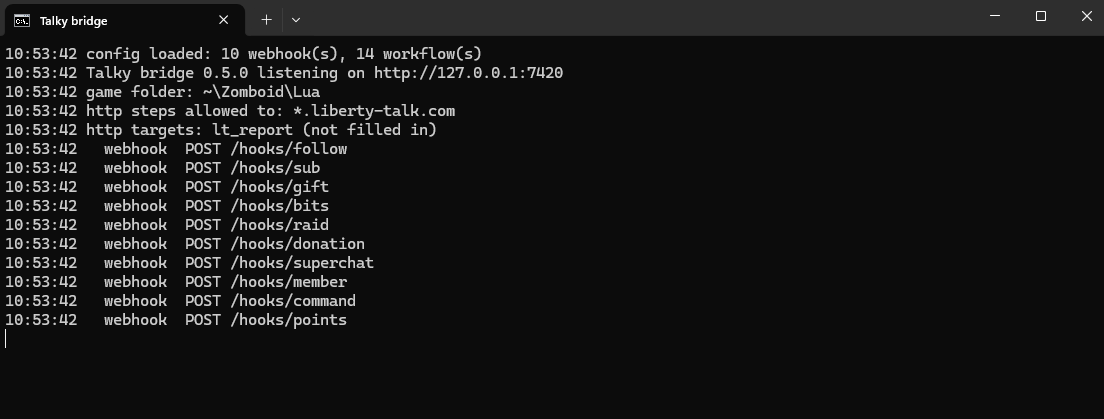
Double-click start-bridge.cmd. A black window titled "Talky bridge" opens. It checks that Node.js 18 or later is installed, then starts the bridge. On the first launch, the bridge creates bridge\config.json from bridge\config.example.json: it draws a random 48-character token, sets the language of the examples to the one of Windows (fr when the regional format is French, en otherwise) and copies the token to the clipboard without showing it. You'll paste it into the widget at the end of this part. The window then shows these lines, each prefixed with the time:
created ~\Documents\Talky\bridge\config.json with a random token (language: en)
the token is in your clipboard and in config.json, never shown here: paste it into "Bridge token" in the LibertyTalk widget
created ~\Zomboid\Lua\talky_config.json from config.json
config loaded: 10 webhook(s), 14 workflow(s)
Talky bridge 0.4.0 listening on http://127.0.0.1:7420
game folder: ~\Zomboid\Lua
http steps allowed to: *.liberty-talk.com
  webhook  POST /hooks/follow
  webhook  POST /hooks/sub
  webhook  POST /hooks/gift
  webhook  POST /hooks/bits
  webhook  POST /hooks/raid
  webhook  POST /hooks/donation
  webhook  POST /hooks/superchat
  webhook  POST /hooks/member
  webhook  POST /hooks/command
webhook POST /hooks/pointsDocuments\Talky. With a French regional format, the first line ends with (language: fr) and the third with (fr: 19 text(s) translated). These three lines only show on the first launch: afterwards, the bridge keeps config.json as it is. The version number and the counts follow your installation.Tip
The token is a password
The token in bridge\config.json protects your bridge's address: anyone who knows it can spawn zombies in your game. The bridge never shows it and only copies it to the clipboard on the first launch. Don't open config.json on stream. If the copy failed, the second line starts with the token is in config.json ("token"). In that case, or if you copied something else since, open config.json off stream and copy the token value, without the quotes. If the token may have leaked, run node bridge\bridge.js new-token in the Talky folder: the bridge writes a new token in config.json and copies it to the clipboard. Restart the bridge and paste it into "Bridge token" in the widget.
Tip
The language of the examples
The example workflows (banner texts, reward words) are written once, on the bridge's first launch, in the language set in settings.language of bridge\config.json, or the one picked in the F8 menu if you set it before that first launch. The bridge sets fr there when the regional format of Windows is French, en otherwise. Changing "Language of the bridge texts" in the F8 menu afterwards doesn't translate the examples already written: to get them in the other language, stop the bridge, set settings.language to fr or en in bridge\config.json, delete %USERPROFILE%\Zomboid\Lua\talky_config.json, then restart the bridge, losing the changes made in the F8 menu.
At every start, the bridge can also show lines that start with warning:. It starts anyway, but each one points at a setting to fix: cloudflared missing from the PATH, Talky installed twice (a copy in Zomboid\mods on top of the Workshop), or the bridge folder placed in Zomboid\mods. The troubleshooting at the end of this part gives the fix for each.
Keep this window open for the whole session: if you close it, nothing reaches the game anymore. If the bridge stops on an error, the window shows the message, then The bridge has stopped., and waits for you to press a key. In its messages, config.json errors included, the bridge writes ~ instead of your user folder, which keeps your Windows user name off screen if the window shows up on stream.
config.json show before them.Enable the mod and open the menu
Step 1
Enable the mod
In Project Zomboid's main menu, open Mods and tick Talky - LibertyTalk Live Events.
Step 2
Start a game
A new single-player game or a saved one.
Step 3
Open the Talky menu with F8
You can change the key in Options > Keybinds > Talky, "Open the Talky window" line.
Step 4
Check the Status page
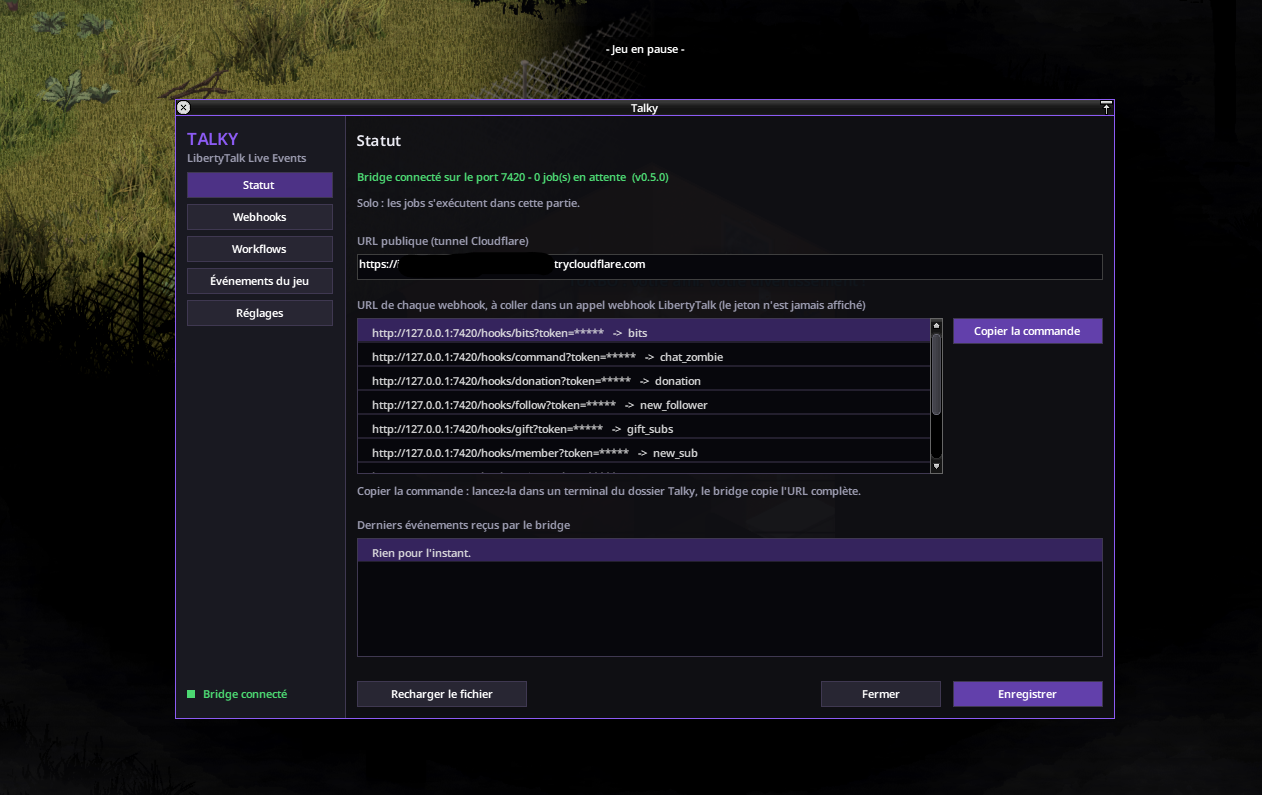
At the bottom left, the pill must show "Bridge connected" in green, and the top of the page "Bridge connected on port 7420 - 0 job(s) waiting", followed by the bridge version, then the "Single player: the jobs run in this game." line. A red "Bridge offline" pill comes with the message "Bridge offline: run start-bridge.cmd (or node bridge/bridge.js) on this PC." In that case, see troubleshooting at the end of this part.
The window has five pages, listed on the left under "TALKY". Status shows the connection, the public address and the latest events received. Webhooks lists the /hooks/<id> addresses LibertyTalk calls. Workflows holds what the game does for each event. Game events links the death of a named zombie or of the player to a workflow. Settings sets the caps, for example "Max zombies per action" at 60. The Save button, bottom right, turns into Save * while a change isn't saved.
Test without LibertyTalk
Before plugging in Twitch, check that the bridge and the mod talk to each other. In the F8 menu, Workflows page, select new_follower in the list on the left, type Bob in the "Test with the name" field and click Test now. The game confirms the test was sent with a notice, and the bridge window writes a line such as [test] new_follower -> 3 game step(s) (job #1) user=Bob, whose job number goes up with each run.
You can also run the test from a second terminal opened in the Talky folder, while the bridge is running:
node bridge\bridge.js fire new_follower user=Bob200 {"ok":true,"results":[{"workflow":"new_follower","job":2,"steps":3}]} and the bridge window writes a [fire] new_follower -> 3 game step(s) line.In the game, the "Bob joins the horde!" banner shows ("Bob rejoint la horde !" with the French examples), then a zombie named "Bob" appears between 8 and 14 tiles from your character. If nothing shows up, check that the game isn't paused: the mod runs nothing while paused, in the main menu or when your character is dead. Test now also sends bits at 500, viewers at 10 and tier at 1000: on the bits workflow, it spawns 5 zombies.
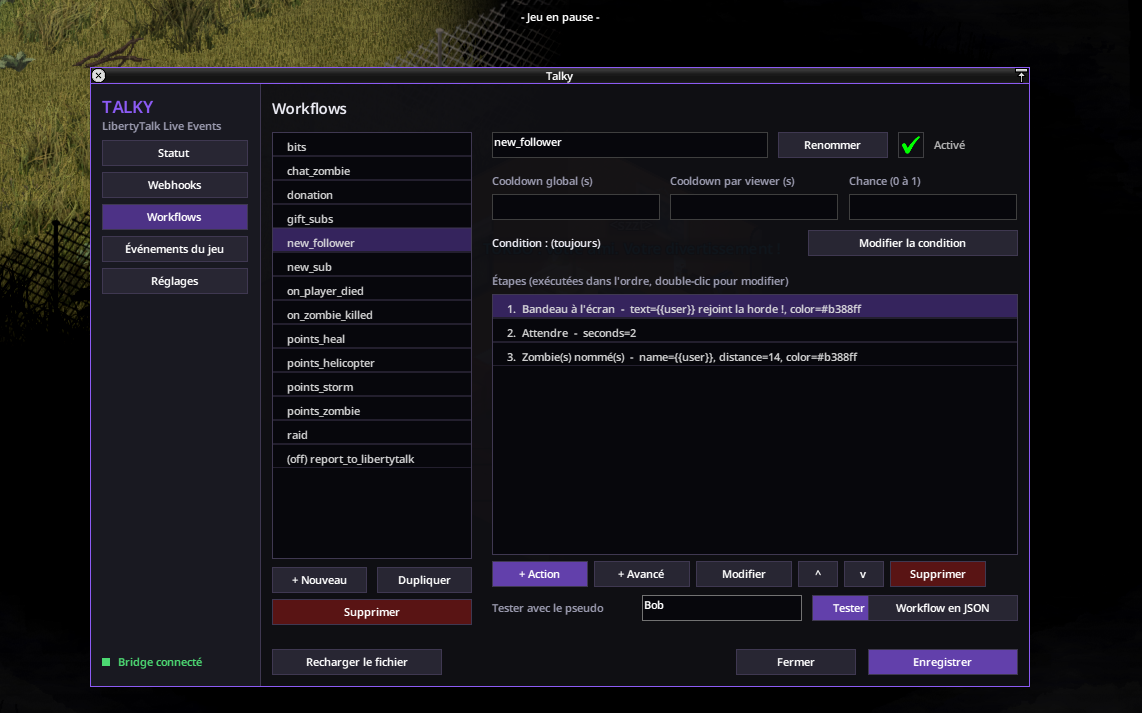
new_follower workflow: a banner, a two-second wait, then a named zombie.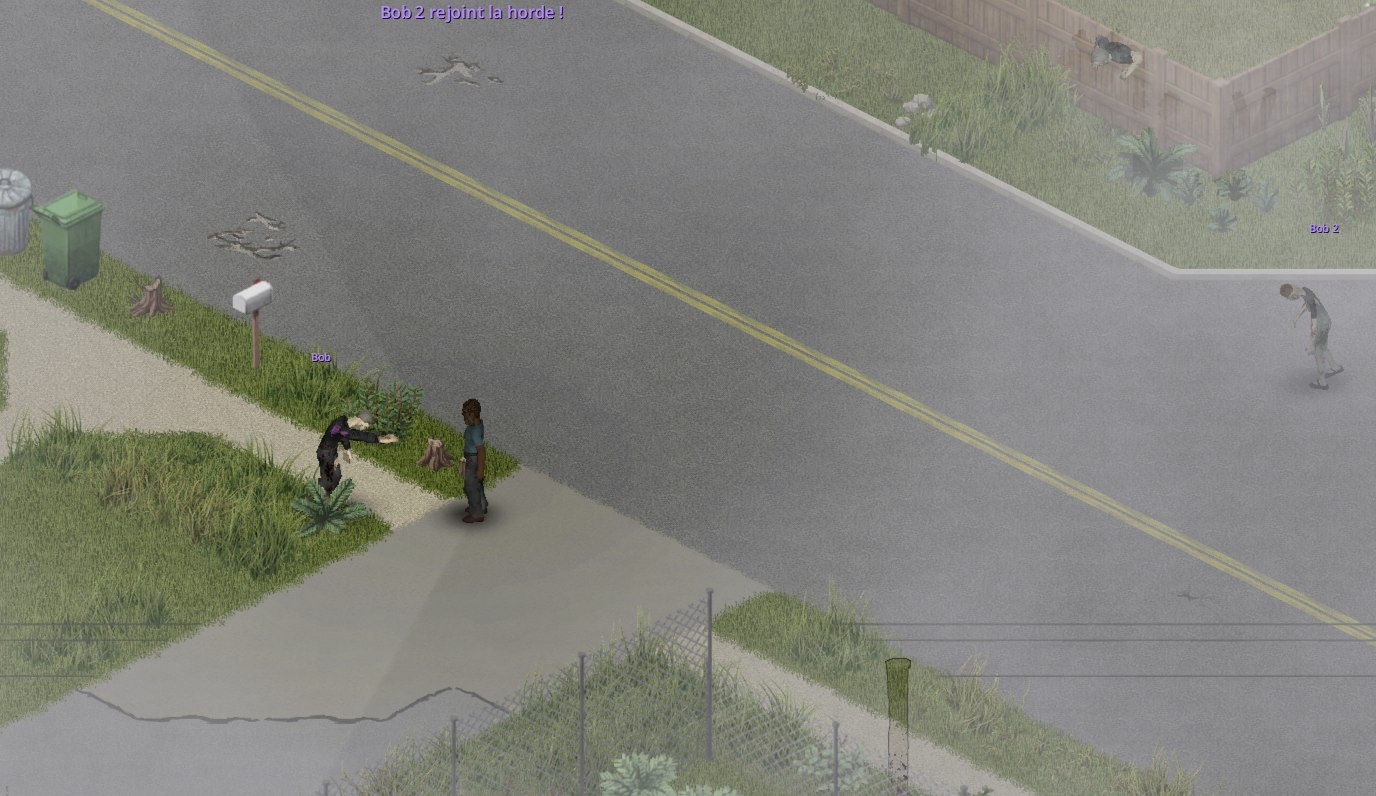
Open the tunnel
LibertyTalk refuses to call a local address such as 127.0.0.1, to block requests to private networks. The cloudflared tunnel gives the bridge a public https address. In a new terminal, run:
cloudflared tunnel --url http://127.0.0.1:7420https://...trycloudflare.com address. Copy it and keep the window open.Warning
A new address on every launch
This quick tunnel, without a Cloudflare account, changes address every time you restart cloudflared. At each session, copy the new address into the widget (next step). To keep the same address from one stream to the next, you need a named tunnel on your own domain, with a Cloudflare account (Cloudflare documentation).
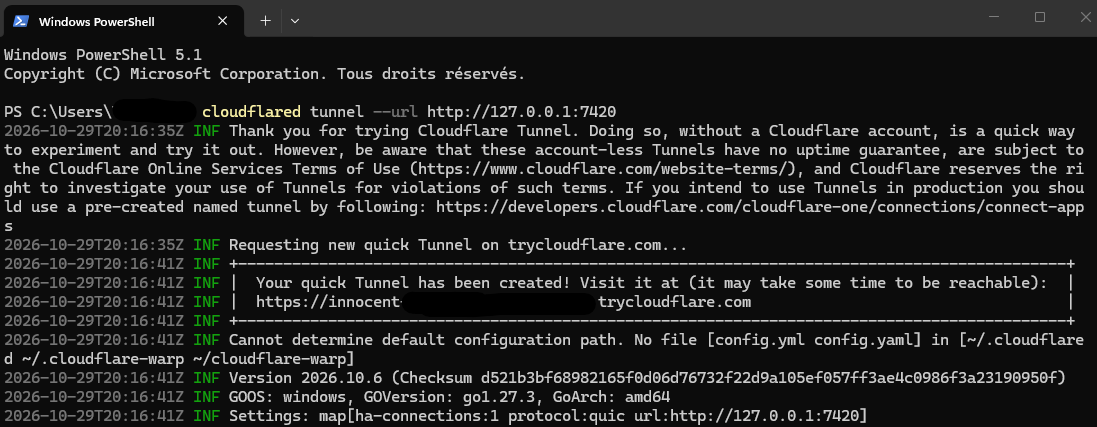
Optional: also paste this address in F8, Status page, "Public URL (Cloudflare tunnel)" field, then click Save. The webhook list then shows their public addresses, token masked. Copy command copies node bridge\bridge.js url <webhook> for the selected webhook: run in a terminal opened in the Talky folder, this command puts the full URL, token included, in the clipboard and prints it masked. The game never sees the token. The widget doesn't need it: this command is for when you build a LibertyTalk workflow yourself.
Install the official widget
The official "Project Zomboid · Talky" widget already holds the ten LibertyTalk chains that call the bridge: follow, subscription, gifted subs, bits, raid, channel points, chat command, Streamlabs donation, Super Chat and new YouTube member. You fill in the tunnel address and the token, then you activate it.
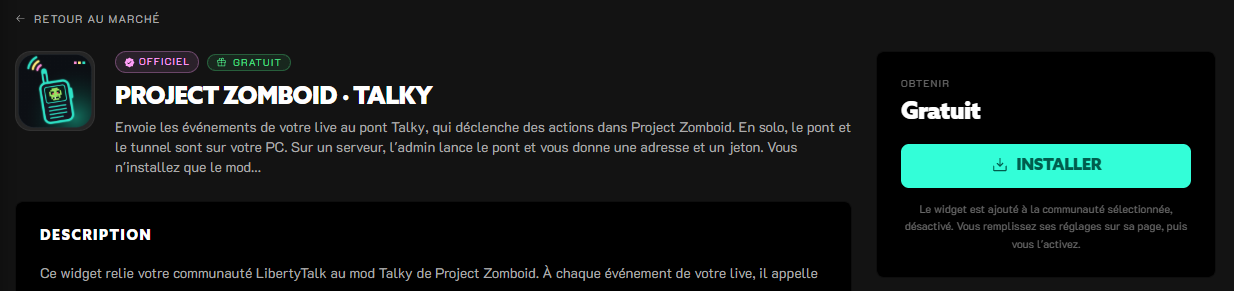
Project Zomboid · Talky
Free widget published by LibertyTalk. Ten Twitch and YouTube triggers wired to the bridge, each with its own checkbox.
Step 1
Install it in your community
Select your community in the sidebar. On the widget's page in the Marketplace, click Install. The same button is on its card in the Official library of Widgets. LibertyTalk adds the widget to the selected community, switched off, then opens its page.
Step 2
Keep the Global scope
On the widget's page, keep the Global scope, selected by default: the widget will listen to every Twitch and YouTube account of the community. To come back to this page later, open Widgets and click the Project Zomboid · Talky card, under "Workflow widgets".
Step 3
Fill in its configuration
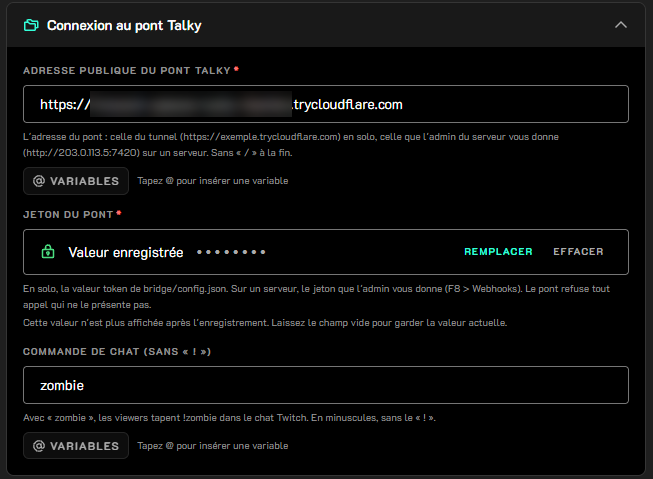
In the Widget configuration tab, open the "Talky bridge connection" section and fill in "Talky bridge public URL" and "Bridge token". The table below details each field. Click Save: the "Widget configuration saved." message confirms it.
Step 4
Activate it
In the Activation block, click Activate: the "Inactive on Global." line turns into "Active on Global." and the Listening to block lists the accounts it listens to. The page won't activate while a configuration change isn't saved. If only your Twitch channel is connected, the YouTube triggers stay silent; they plug in when you connect YouTube to the community.
| Field | What to enter |
|---|---|
Talky bridge public URL (talky_bridge_url) | Required. The https address given by cloudflared, for example https://your-tunnel.trycloudflare.com, without a trailing /. |
Bridge token (talky_token) | Required. The token value from bridge\config.json, without the quotes: the one the bridge copied to your clipboard on its first launch. LibertyTalk treats it as a secret: it isn't shown again after saving and it's masked in execution traces. To change it, type the new value. |
Chat command (without "!") (talky_command) | The command, lowercase and without the !. Default zombie: a viewer types !zombie in Twitch chat. The field only shows when "Send the chat command" is ticked. |
Send follows to Send new YouTube members (talky_on_follow to talky_on_member) | "Events sent to the game" section: ten boxes, all ticked by default. Untick an event so it no longer reaches the game, for example "Send raids" if you don't want a horde during a raid. |

Tip
Every session
Start start-bridge.cmd and cloudflared again, paste the new tunnel address into "Talky bridge public URL", Widget configuration tab, and click Save. The change applies right away, without deactivating the widget.
Check end to end
Ask someone to follow your channel, or follow it from a second account. A few seconds later, the bridge window writes a [hook:follow] new_follower -> 3 game step(s) line, the zombie appears, and in F8, Status page, the "Latest events received by the bridge" list shows hook:follow -> new_follower (Name) after the time. On the LibertyTalk side, open the Executions tab of the widget's page and click "Load last run" to see the same run.
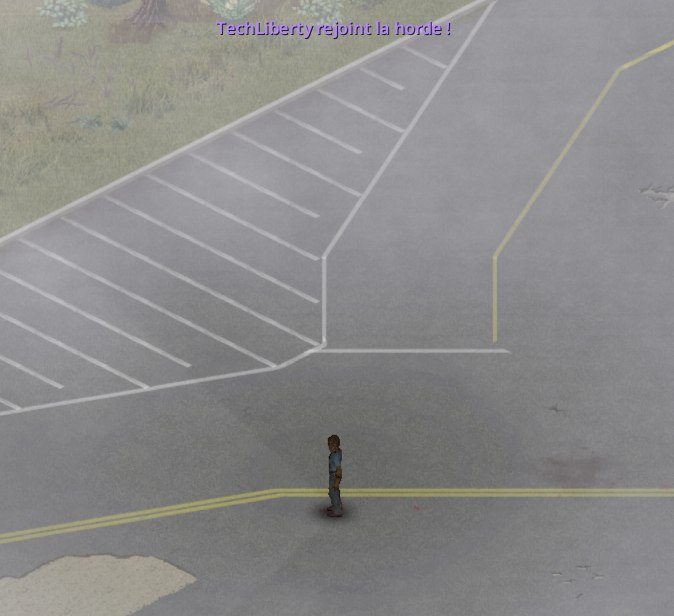

hook:follow) and ran new_follower.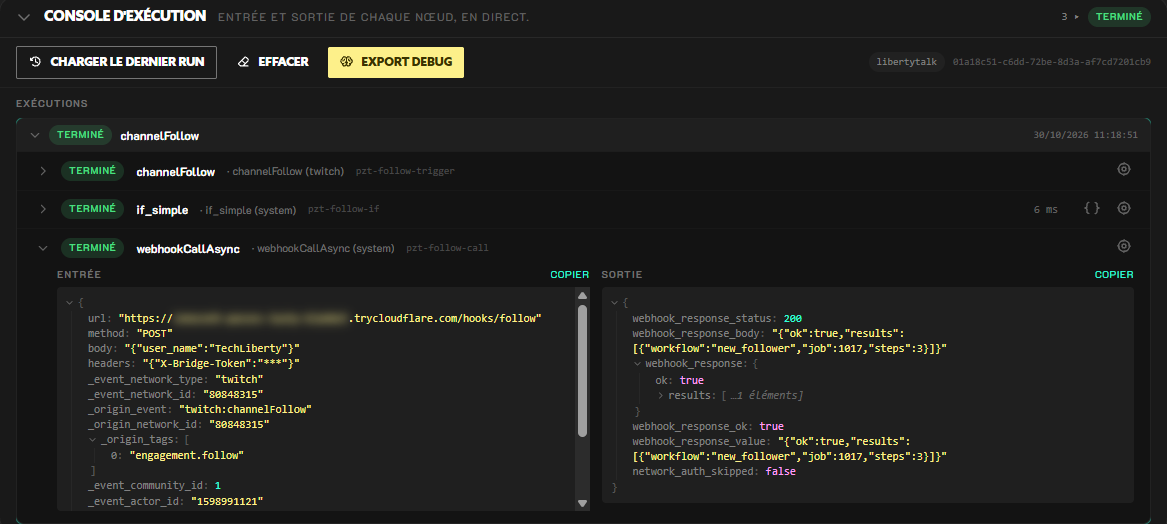
webhook_response_status at 200 and webhook_response_ok at true. Tunnel address blurred, token hidden.Troubleshooting
F8 shows "Bridge offline".
-cachedir option, the game reads another folder: set that Lua folder in zomboidLuaDir in bridge\config.json, then restart the bridge.The bridge window shows a warning: line.
warning: cloudflared is not in the PATH: install cloudflared with winget install --id Cloudflare.cloudflared, then close the window and start start-bridge.cmd again; if you run cloudflared from its own folder, ignore this line. warning: Talky is installed twice: the mod is both in %USERPROFILE%\Zomboid\mods\Talky and on the Workshop; delete the folder in Zomboid\mods, the Workshop version is enough. warning: The bridge folder ... is inside ...\Zomboid\mods: move the whole Talky folder out of Zomboid\mods, bridge\config.json included, for example to Documents\Talky, then start start-bridge.cmd again from there. The token doesn't change.The bridge window shows Cannot create ...\bridge\config.json.
config.json into the Talky folder, for example because you extracted it under C:\Program Files. Move the folder to Documents\Talky and start start-bridge.cmd again.The bridge window shows Set a long random "token".
bridge\config.json is empty or still starts with change-me, which happens when config.example.json was copied by hand. Replace it with a long random string, or delete config.json and start start-bridge.cmd again: the bridge creates a new one, with a new token to paste into "Bridge token" in the widget.node bridge\bridge.js fire shows No config at ....
bridge\config.json doesn't exist yet: the fire command doesn't create it. Start the bridge once with start-bridge.cmd first, then run the command again while it's running.The window shows Node.js was not found on this PC. or Node.js ... is too old.
winget install OpenJS.NodeJS.LTS (or winget upgrade OpenJS.NodeJS.LTS to update), close the window, then start start-bridge.cmd again. A window opened before the install doesn't see Node.js yet.The bridge shows Port 7420 is already used.
port in bridge\config.json, for example to 7421, and use the same port for the tunnel: cloudflared tunnel --url http://127.0.0.1:7421.A follow happens on Twitch but nothing moves in F8.
webhook_response_status in the output of the call step. 401: the token doesn't match. The bridge checks the token before anything else and answers 401 even for a webhook that doesn't exist: copy token from config.json into "Bridge token" again. The widget sends this global token: if that webhook is in hookTokens of bridge\config.json, it refuses it, so remove it from hookTokens and restart the bridge (F8, Webhooks page, "Dedicated token": "Yes" or "No"). 404: the token is right, but the webhook was renamed or deleted in F8; the widget calls follow, sub, gift, bits, raid, points, command, donation, superchat and member. Code 0 or 5xx: the tunnel is closed or its address changed. A run that stops at the "If (classic)" node: the event's box is unticked. No run at all: the widget isn't activated, or the Listening to block doesn't list that account.The webhook call step shows "Failed".
Webhook URL is empty, or it holds a local address such as http://127.0.0.1:7420, which LibertyTalk refuses. Paste the tunnel's https://...trycloudflare.com address and click Save.A gifted sub doesn't run new_sub.
gift webhook with total at 5: the bridge runs gift_subs once instead of six workflows.The bridge shows job #N but nothing happens in the game.
jobTtlSeconds in config.json) is dropped, so you don't receive all the events of a stream played with the game closed at once. Finally, at most 8 workflows run at the same time (Settings page, "Max workflows running at the same time") and at most 200 jobs wait for their turn: the next ones stay in the bridge, and the game picks them up a few seconds later.F8 shows "skipped: cooldown" or another reason.
points_helicopter. "condition not met": the condition set with "Edit condition" is false. "chance roll lost": the "Chance (0 to 1)" field said no. "workflow disabled": the "Enabled" box is unticked. "no matching route": no route of the points webhook recognises the reward title (see part 2).The !zombie zombie is called "Anonymous".
Nothing arrives after restarting the tunnel.
The mod isn't in the mod list.
%USERPROFILE%\Zomboid\mods\Talky\42\mod.info: copy the zip's Talky folder, not the folder that holds it. Also check that there aren't two copies of the mod, the Workshop one and %USERPROFILE%\Zomboid\mods\Talky, and keep only one.Bits trigger nothing.
bits:read permission from Twitch. If your Twitch channel was connected before that permission was added, reconnect Twitch to the community.YouTube Super Chats and new members don't arrive.
Donations don't arrive.
The bridge refuses an http step of a workflow.
http step refused: host "..." is not in httpAllowedHosts (bridge/config.json) and the Status page shows the same reason after "error:". The bridge only calls the hosts listed in httpAllowedHosts in bridge\config.json, LibertyTalk's by default (*.liberty-talk.com), as the http steps allowed to line reminds you at startup. Add the host you need there, then restart the bridge. This list lives in config.json and not in talky_config.json, which other game mods could rewrite.F8 shows "Bridge older than 0.4.0".
Documents\Talky, replacing the files. The zip doesn't contain bridge\config.json: the bridge's token and configuration stay the same. Then start start-bridge.cmd again.F8 shows "Single player: the Talky game code did not start".
%USERPROFILE%\Zomboid\console.txt for a Lua error that mentions Talky. Once it's fixed, load the game again: Talky only runs this check again when a game loads.Where are the logs?
%USERPROFILE%\Zomboid\console.txt, lines prefixed with [Talky]. The address http://127.0.0.1:7420/health?token=<your token>, opened in a browser on the same PC, returns the version, the number of pending jobs and the last 50 events. Don't show it on stream: it contains your token.Understand workflows with Talky
What the widget does, where to put the logic, three worked examples, then the way back from the game to LibertyTalk.
Two engines, one model
A LibertyTalk workflow starts from a trigger, an event such as "New follower", then runs its nodes in order and passes them the event's data. The Talky bridge has its own, smaller engine: each /hooks/<id> webhook runs a bridge workflow, a list of steps the mod carries out in the game.
- Trigger
New follower
Twitch trigger, it provides
{user_name}. - Condition
If (classic)
Is the "Send follows" box (
talky_on_follow) ticked? - Action
Webhook / API call (background)
POST to
{talky_bridge_url}/hooks/follow. - Outside LibertyTalk
Bridge: follow webhook
Runs the bridge's
new_followerworkflow. - Outside LibertyTalk
Mod: three steps
notify,wait,spawn_zombie.
Keep this boundary in mind: LibertyTalk decides which events go to the game and with which data, the bridge decides what happens in the game.
What the official widget does
The widget holds ten chains built on the same pattern: a trigger, an "If (classic)" node that tests the event's box, then a "Webhook / API call (background)". Each call sends a POST to {talky_bridge_url}/hooks/<id> with the {"X-Bridge-Token":"{talky_token}"} header. The call runs in the background so a slow tunnel doesn't delay your community's other events. The subscription chain also tests is_gift: it only relays subscriptions that aren't gifts, the gift chain handles the rest.
| Trigger | Bridge webhook | Data sent | Bridge workflow |
|---|---|---|---|
| New follower (Twitch) | follow | user_name | new_follower |
| New subscriber (Twitch), gifted subs excluded | sub | user_name, tier, is_gift | new_sub |
| New subscriber gift (Twitch) | gift | user_name, total, tier | gift_subs |
| Bits received (cheer) | bits | user_name, bits | bits |
| Raid received | raid | user_name, viewers | raid |
| Channel points reward | points | user_name, reward_title | routes by reward_title |
Command received, filtered on {talky_command} | command | command | chat_zombie |
| Donation received (Streamlabs) | donation | donor, amount, formatted_amount | donation |
| Super Chat (YouTube) | superchat | author_display_name, formatted_amount | donation |
| New member (YouTube) | member | author_display_name | new_sub |
The bridge workflows in the last column are the ones shipped with Talky. You edit them in F8, Workflows page, without touching the widget. For example, Super Chats and donations share donation, which draws either a shotgun with shells, a heal with canned food, or a pickup truck.
Good to know
Why the command arrives without a name or text
Twitch's developer agreement forbids redistributing chat messages outside Twitch. LibertyTalk applies this rule to marketplace widgets: a widget can send neither the name of a chat message's author nor the text of that message to an outside service (platform rules). A !zombie command is a chat message, so the command webhook only receives {"command":"zombie"}. As a result, !zombie and !zombie Bob do the same thing, and the zombie carries the bridge's name for anonymous events, "Anonymous" in English, or the value of "Name for anonymous events" in F8, Settings page. The widget doesn't send the text a viewer types with a channel points reward either: the bridge routes work on the reward title.
For a viewer to get a zombie named after them, use an event that provides a name outside the chat: a follow, bits, or a channel points reward whose title contains "zombie". That last one runs points_zombie, which names the zombie after the viewer who redeemed the reward.
Variables
In LibertyTalk, a variable is written between single braces. Each trigger declares its own: "Bits received (cheer)" provides {bits}, {user_name} and {is_anonymous}, and "Channel points reward" provides {reward_title} and {reward_cost}. The editor's variable picker offers them in the nodes that follow.
The widget variables, {talky_bridge_url}, {talky_token} and {talky_command}, are filled in at install time and read again on every run. They carry the talky_ prefix because the event's data takes priority: a widget variable named user_name would be hidden by the trigger's. {talky_token} is declared secret: its value is masked in execution traces.
A misspelled variable stays as it is: with {user_nmae}, the bridge receives that text and your zombie is called "{user_nmae}". A variable the trigger declares but the event lacks becomes empty, like {user_name} for an anonymous cheer; the bridge then uses its default name.
The bridge has its own templates, between double braces, with filters: {{bits | div:100 | floor}} gives 4 for 450 bits. {{user}} takes the first filled field among user_name, author_display_name, donor and a few others, which lets the same new_sub workflow serve Twitch subscribers and YouTube members. When none of these fields is filled, {{user}} is the name of anonymous events.
Tip
Writing a JSON body
Put each variable between quotes inside valid JSON, such as {"bits":"{bits}"}. LibertyTalk then escapes the values: a quote in a reward title, such as Call "now", no longer breaks the body. Values travel as text; the bridge converts bits, viewers, total, amount and tier to numbers before testing its conditions.
Warning
Keep bridge templates in the bridge
Don't write {{user_name}} in a LibertyTalk field: LibertyTalk replaces the {user_name} part and the bridge receives {Bob}. Double-brace templates belong in F8, Workflows page.
Decide in LibertyTalk or in the bridge
The two engines don't do the same things. LibertyTalk has no loop or math node: a node can't repeat itself "once per 100 bits". The bridge, for its part, only sees what LibertyTalk sends it. This table shows where each need belongs.
| Need | In LibertyTalk | In the Talky bridge |
|---|---|---|
| Choose which events reach the game | Widget boxes ("If (classic)") and trigger filters such as filter_command | A workflow's "Enabled" box |
| Route on a text, such as a reward title | "Switch" with "~ matches regex" | routes with contains or matches |
| Compute a number, such as bits ÷ 100 | Not possible: no math node | div, floor, clamp filters |
| Repeat an action N times | Not possible: a workflow doesn't loop | repeat step with a max cap |
| Pick at random | Only by misusing {@uuid}, not recommended | random with weights, or chance |
| Limit the frequency (cooldown) | "Detect spam (repeat / flood)" repurposed, one-hour window at most | cooldownSeconds and userCooldownSeconds |
| Format a text | No, the value is sent as is | upper, lower, truncate, default filters |
| React in chat to a game event | "Incoming webhook", then "Send a message" | http step to that incoming webhook |
In practice, let LibertyTalk route and filter, and hand the bridge the raw numbers. The widget follows this rule: it sends {bits} as is and the bridge works out the size of the horde.
Example 1 · A follow, a named zombie
When Bob follows the channel, the widget sends {"user_name":"Bob"} to /hooks/follow. The bridge runs new_follower, which holds three steps:
notify: a banner with the name, in purple#b388ff.wait: a 2-second pause in the game.spawn_zombie: a zombie named{{user}}, between 8 and 14 tiles from the character, with its name shown in the same colour.
To change this zombie, open F8, Workflows page, new_follower, and double-click the zombie step in the step list. Tick "Crawler" to make it crawl, or set "Count" to 3: three zombies appear, named "Bob #1" to "Bob #3", or all "Bob" with "Same name for all". Click OK, then Save: the bridge reloads the configuration without restarting.
Example 2 · Bits, a horde to match
The widget passes {bits} on unchanged, because LibertyTalk can neither divide a number nor repeat a node. The bridge's bits workflow does the math:
"bits": {
  "steps": [
    { "if": { "bits": { "gte": 1000 } },
      "then": [ { "action": "helicopter" } ],
      "else": [
        { "if": { "bits": { "gte": 100 } },
          "then": [
            { "repeat": "{{bits | div:100 | floor}}", "max": 20, "steps": [
              { "action": "spawn_zombie", "name": "{{user}}", "sameName": true, "distance": 18 },
              { "action": "wait", "seconds": 1 }
            ] }
          ],
          "else": [ { "action": "noise", "radius": 25 } ] }
      ] }
  ]
}bits workflow shipped with Talky, without the notify steps that show the banners.- 450 bits:
450 / 100rounded down gives 4 zombies named after the viewer, one per second, at most 18 tiles away. - 1,000 bits or more: the helicopter comes over, with no named zombie.
- Under 100 bits: a noise draws the zombies within 25 tiles.
The max: 20 cap protects the game if you remove the helicopter branch: 5,000 bits would otherwise give 50 zombies. To test without spending bits, Test now on bits sends 500 bits, which makes 5 zombies.
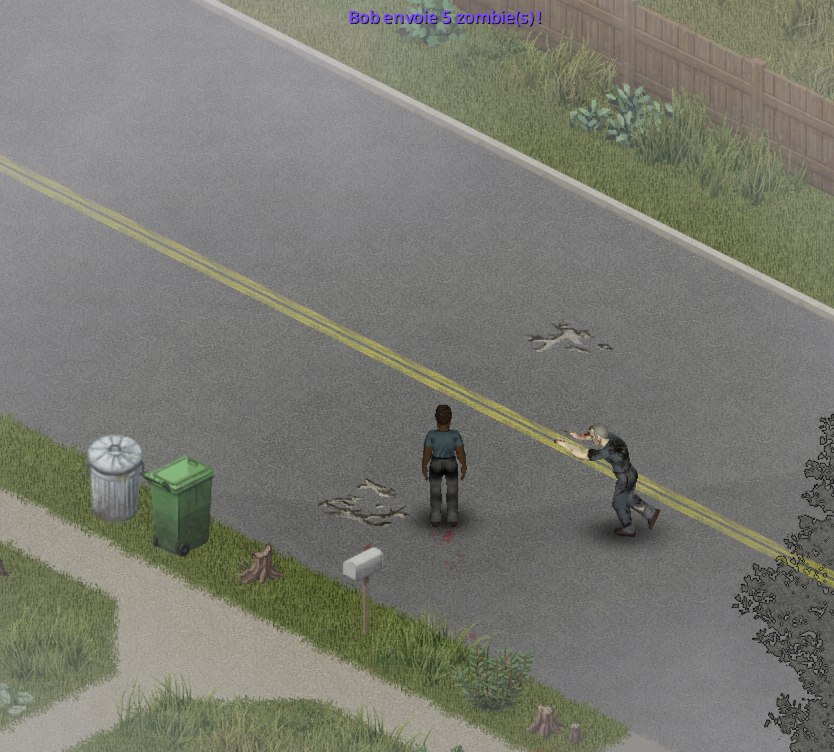
bits workflow: the zombies come in one per second.Good to know
What about a Switch?
In LibertyTalk, a "Switch" on bits can send fixed tiers to different webhooks, for example 100, 500 and 1,000 bits. It can't produce one zombie per 100 bits: that math stays in the bridge.
Example 3 · A points reward, an event of your choice
The widget sends every channel points reward to the same webhook, points, with user_name and reward_title. The bridge picks the workflow with routes: the first one whose condition is true wins. The routes shipped with Talky look for a word in the title, in English unless the bridge was first started with settings.language set to fr:
- "helicopter" runs
points_helicopter: the helicopter comes over, at most once every 10 minutes. - "heal" runs
points_heal: full heal and floating text with the viewer's name. - "storm" runs
points_storm: 3 in-game hours of storm. - "zombie" runs
points_zombie: a zombie whose name, in light blue, is the name of the viewer who redeemed the reward.
The bridge's contains comparison ignores case: "Call the Helicopter" matches, but "Call the chopper" doesn't, and a bridge first started in French looks for hélico, soin and tempête. Routes using matches accept several spellings and both languages. A reward that matches no route runs nothing: the Status page shows it with "skipped: no matching route".
[
  { "when": { "reward_title": { "matches": "h[ée]lico" } },        "workflow": "points_helicopter" },
  { "when": { "reward_title": { "matches": "soin|heal" } },        "workflow": "points_heal" },
  { "when": { "reward_title": { "matches": "temp[êe]te|storm" } }, "workflow": "points_storm" },
  { "when": { "reward_title": { "contains": "zombie" } },          "workflow": "points_zombie" }
]points, "Edit routes (JSON)" button. h[ée]lico matches "hélico", "helico" and "helicopter".The same logic in LibertyTalk
Would you rather see the routing in the workflow editor? Untick "Send channel point rewards" in the widget to avoid duplicates, then build your own workflow:
Step 1
The trigger
"Channel points reward" on your Twitch account.
Step 2
An exclusive Switch
"Switch" in "Exclusive (first match)" mode, one case per reward, for example
reward_title"~ matches regex"/h[ée]lico/iu.Step 3
One variable per case
In each branch, "Set a variable" named
talky_hook, with the valuehelicopter,healorstorm.Step 4
A single call
Connect every branch to the same "Webhook / API call (background)": URL
https://your-tunnel.trycloudflare.com/hooks/{talky_hook}, method POST, headers{"X-Bridge-Token":"your token"}, body{"user_name":"{user_name}","reward_title":"{reward_title}"}. Since this workflow isn't the widget, its address must be updated with every new tunnel.Step 5
The bridge-side webhooks
In F8, Webhooks page, create
helicopter,healandstormwith + New, then Rename, and link them topoints_helicopter,points_healandpoints_storm.
Warning
Two differences from the bridge
In LibertyTalk, contains is case-sensitive: "Hélico" doesn't contain "hélico". And a regular expression is written between delimiters with its flags, /h[ée]lico/iu: without the /, a pattern starting with [ or ^ is misread and the condition stays false.
A single final call rather than one call per branch: beyond 5 HTTP calls reachable from one trigger, the editor shows a warning when you save.
Limit the frequency
Each bridge workflow has two delays, set in F8, Workflows page: "Global cooldown (s)" blocks the workflow for everyone, "Cooldown per viewer (s)" for the same name. By default, points_helicopter waits 600 seconds between two helicopters, and chat_zombie 20 seconds between two zombies.
chat_zombie has no "Cooldown per viewer (s)": the chat command arrives without a name, so every viewer carries the same default name, and a per-viewer delay would act as a global one. To space out !zombie, raise its "Global cooldown (s)".
Good to know
Delays kept in memory
The bridge keeps its delays in memory: restarting start-bridge.cmd resets them.
On the LibertyTalk side, no node is meant for this, but the "Detect spam (repeat / flood)" moderation node can act as a delay: scope network_id, a constant value to compare (helico), a 600-second window, "Flood: max messages in the window" set to 2, then "If (classic)" on is_flood false. The first pass goes through, the next ones are blocked until the window ends, and a window can't exceed one hour.
From the game back to LibertyTalk
The mod sends three events back to the bridge: zombie_killed with name and byPlayer when a named zombie dies, player_died with hoursSurvived and zombieKills, and game_started. F8, Game events page, links each one to a bridge workflow. Example: post "Bob's zombie is down." in your Twitch chat, with the disabled report_to_libertytalk workflow Talky ships for this.
Step 1
Create the incoming webhook
In LibertyTalk, create a workflow with the "Incoming webhook" trigger and save it: the "Webhook URL & secret" field shows the address, ending in
/webhooks/workflow/<token>, and the secret.Step 2
Read the zombie's name
In "Variables from the payload", add the target variable
namewith the keyname.Step 3
Post in chat
Add the Twitch "Send a message" action with the content
{name}'s zombie is down., then activate the workflow.Step 4
Fill in the bridge target
Off stream, open
bridge\config.jsonin a text editor. InhttpTargets>lt_report, replacePASTE_THE_TOKEN_OF_YOUR_INCOMING_WEBHOOKwith the token at the end of the incoming webhook's address andPASTE_THE_SECRET_OF_YOUR_INCOMING_WEBHOOKwith its secret, save, then restart the bridge. This file stays out of reach of the game and its mods; while aPASTE_value remains, the bridge refuses the step.Step 5
Turn on the bridge workflow
In F8, Workflows page, select
report_to_libertytalk, tick "Enabled", then click Save. Itshttpstep only says"target": "lt_report": the address and the secret don't go throughtalky_config.json. If yourtalky_config.jsoncomes from Talky 0.3.0, this step still carriesurlandheaders: replace them with"target": "lt_report"("Workflow as JSON" button), otherwise the bridge sends the call with a warning.Step 6
Link the game event
On the Game events page, pick
report_to_libertytalkfor "A named zombie dies", then click Save.
"httpTargets": {
  "lt_report": {
    "url": "https://api.liberty-talk.com/webhooks/workflow/PASTE_THE_TOKEN_OF_YOUR_INCOMING_WEBHOOK",
    "headers": { "X-Webhook-Secret": "PASTE_THE_SECRET_OF_YOUR_INCOMING_WEBHOOK" }
  }
}lt_report target as shipped with Talky, before you fill it in. The bridge reads this file when it starts."report_to_libertytalk": {
"enabled": false,
"steps": [
{ "action": "http", "target": "lt_report",
"body": { "event": "{{event}}", "name": "{{name}}", "hoursSurvived": "{{hoursSurvived}}", "zombieKills": "{{zombieKills}}" } }
]
}report_to_libertytalk workflow as shipped with Talky: its step names the target, the address and the secret stay in bridge\config.json. The incoming webhook answers 202 when it accepts the call.The api.liberty-talk.com host is in httpAllowedHosts by default, so the step goes through without any setting. It runs in the background: it delays neither the game nor the other events. Linking "A named zombie dies" to report_to_libertytalk replaces on_zombie_killed, which spawns two "cousins" of the dead zombie 30% of the time. To keep both, copy the http step into the steps of on_zombie_killed instead.
The body also sends event, hoursSurvived and zombieKills. Link "The player dies" to the same workflow, also declare the event and hoursSurvived variables in "Variables from the payload", and a "Switch" with a case where event equals player_died can post another message when you die, for example Died after {hoursSurvived} h of survival.
Warning
No endless round trip
A bridge workflow started by a webhook must not call back the incoming webhook that triggered it: LibertyTalk and the bridge would bounce the event back and forth. LibertyTalk shuts off an incoming webhook that receives too many calls.
Test and debug
Test the bridge alone first, with Test now or node bridge\bridge.js fire. To test the path from LibertyTalk to the bridge without waiting for a real follow, create a workflow with the "Manual trigger" and, in "Simulated variables", user_name set to Bob. Add a "Webhook / API call" to https://your-tunnel.trycloudflare.com/hooks/follow, with the {"X-Bridge-Token":"your token"} header and the {"user_name":"{user_name}"} body. The manual trigger button works even when the workflow isn't activated.
The execution console shows what each node received and produced. For the widget, open its Executions tab, then click "Load last run". Each step shows its input and output, and the "Variables" button shows every variable available at that point, with secrets masked, {talky_token} included.
Warning
A completed step isn't a successful call
If the bridge refuses the call or doesn't answer, the webhook call step still shows "Completed": LibertyTalk did send the request. Read its output: webhook_response_ok is false and webhook_response_status gives the code received. The step only turns "Failed" when the address is empty (Webhook URL is empty) or refused by LibertyTalk, such as a local address.
| Code received | What it means | What to do |
|---|---|---|
| 200 | The bridge accepted the call. | Look at F8, Status page: the line shows the workflow that ran or the reason it was refused, for example "skipped: cooldown". |
| 401 | Token refused. The bridge checks the token before the webhook: without the right token, every id answers 401. | Copy token from bridge\config.json into "Bridge token". A webhook listed in hookTokens of bridge\config.json refuses this token: remove it from hookTokens and restart the bridge, or call it with the URL that node bridge\bridge.js url <webhook> gives. |
| 404 | The token is right, but the webhook doesn't exist in the bridge. | Recreate the called id in F8, Webhooks page, for example follow. |
| 413 | Body larger than 64 KB. | Remove the long text fields from the body. |
| 0 or 5xx | The tunnel or the bridge doesn't answer. | Check that the bridge and cloudflared windows are open, and that "Talky bridge public URL" holds today's address. |
Known limits
- The quick tunnel's address changes every time cloudflared starts: copy it into the widget at each session, or switch to a named tunnel.
- The chat command arrives without a name or text, because of Twitch's rule on redistributing chat messages: the
!zombiezombie carries the name of anonymous events. - An event waits 15 minutes at most: if the game stays closed or paused longer, it's dropped.
- The bridge caps every workflow: a
waitstep lasts 600 seconds at most,notify,sayandhalotexts are cut at 200 characters, a banner stays 60 seconds at most, and arepeatnever goes beyond 100 rounds, whatever itsmax. - YouTube Super Chats and members only arrive during a live stream, and donations only if Streamlabs is connected.
- Talky 0.5.0 was tested on Build 42.21. A game update can change the functions it uses: update the mod and the bridge together.
Playing Talky on a server
The admin runs the bridge next to the server and adds the streamers from the game; each streamer pastes an address and a token into their widget.
On a server, dedicated or hosted from the main menu of the game, the bridge does not run on the streamers' PCs: the admin runs it on the machine of the server and adds the streamers from the game. Each streamer gets an address and a token, to paste into their LibertyTalk widget. The events of their live happen around their character, and every player sees them.
- The admin of the server installs the mod on the server, runs the bridge next to it, opens a port and adds the streamers.
- Each streamer joins the server, installs the LibertyTalk widget and pastes the address and the token they got. Nothing to install on their PC but the mod, which the server asks for anyway.
For the admin: setting up the server
Step 1
Add Talky to the mods of the server
Dedicated server: in
Zomboid/Server/<server name>.ini, setMods=TalkyandWorkshopItems=3830066321, the id of Talky on the Steam Workshop. The server downloads the mod when it starts, and each player gets it when joining. Hosted game: Host > Manage settings..., Mods page, then Steam Workshop page.Step 2
Set the limits
The options of Talky are on the Talky page of the sandbox options: limits for zombies, items and weather, one switch per category, cooldowns, distance from the other players. Fire and the helicopter are off by default on a server.
Step 1
Install Node.js 18 or later on the machine of the server
On Windows:
winget install OpenJS.NodeJS.LTS. On Linux: thenodejspackage of the distribution if it is version 18 or later, otherwise the one from nodejs.org.Step 2
Extract the Talky zip
Download
Talky-0.5.0.zipfrom the GitHub releases and extract it to a folder of the account that runs the server.Step 3
Start the bridge in server mode
With the account that runs the server:
sh start-bridge.shon Linux,start-bridge.cmd serverin a terminal opened in the Talky folder on Windows. Hosted game:start-bridge.cmd serveron the host's PC. The bridge window showslistening on http://0.0.0.0:7420 (server mode).Step 4
Start the server
Its console shows
[Talky] server ready (Talky 0.5.0), then[Talky] inbox readyon the first read of the jobs.
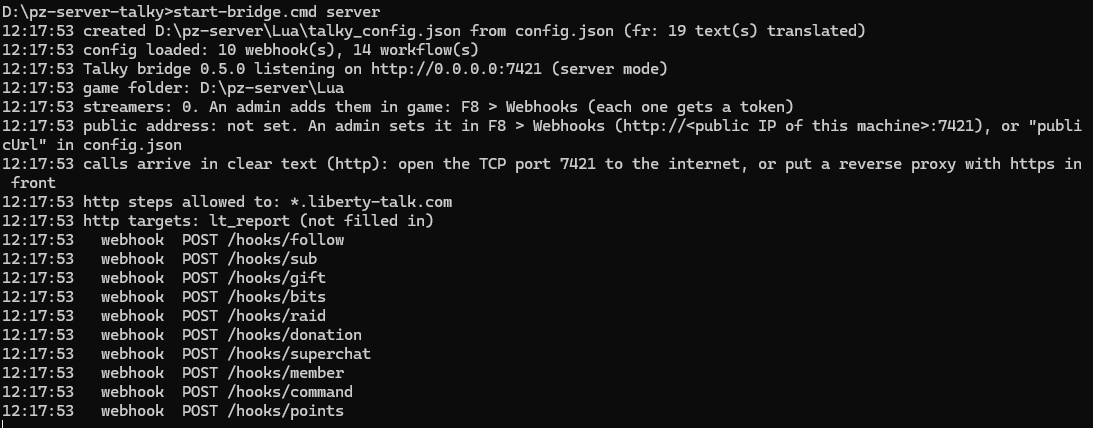
start-bridge.cmd server. Here on port 7421, because a single player bridge already held 7420 on the same machine.![Dedicated server console: *** SERVER STARTED ***, then [Talky] server ready (Talky 0.5.0).](https://d1lvjaji8qt9t1.cloudfront.net/media/db71aa53-d4d8-4bbb-b34f-175defa10774.png)
Good to know
The bridge must use the Zomboid/Lua folder of the server: start it with the account that runs the server. For a server started with -cachedir=<folder>, set zomboidLuaDir to <folder>/Lua in bridge/config.json. On Linux, the zip holds talky-bridge.service, an example systemd unit to start the bridge with the machine.
Step 1
Open the TCP port 7420
In the firewall of the machine (on Linux, for example
sudo ufw allow 7420/tcp; on Windows, an inbound TCP 7420 rule) and in the one of the hosting provider, if any. Hosted game: also forward the TCP port 7420 of the router to the host's PC.Step 2
Note the public address of the bridge
http://<public IP of the server>:7420. A private address (192.168.…,10.…) does not work: LibertyTalk must reach the bridge from the internet.
Step 1
Become admin
The Webhooks page of F8 is reserved to admins and moderators. Dedicated server: type
setaccesslevel "<username>" adminin the console of the server, or log in with theadminaccount created on the first start. Hosted game: see the box below.Step 2
Save the public address
In game: F8 > Webhooks > Streamers tab. Type the address noted above in Public address of the bridge, then Save. The IP alone is enough: Talky adds
http://and the port of the bridge.Step 3
Add each streamer
Type their username at the bottom left, then + Add streamer. A second later, the bridge has drawn a token for them and they show in the list.
Step 4
Send them their address and token
Select them, then Copy URL and token: the clipboard holds the two values of their widget, one per line. Send them in a private message.
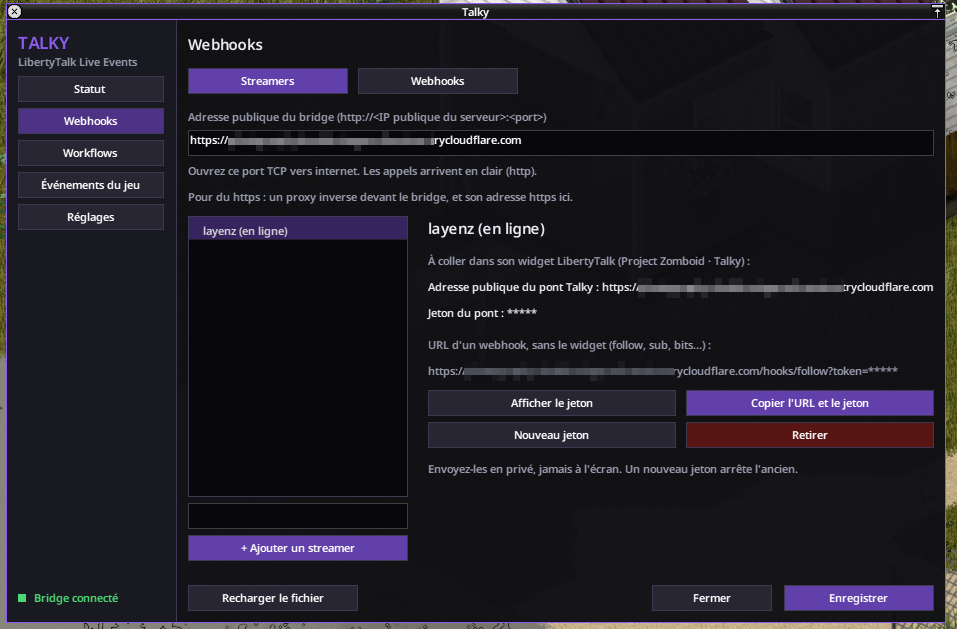
http://<public IP>:7420. The token stays hidden.Warning
The token shows masked in F8; Show token reveals it: do not do it during a live. New token replaces the token of a streamer: the old one stops at once, and the streamer pastes the new one into their widget. Remove stops their token and drops their waiting jobs.
Good to know
Hosted game
In a hosted game, the host's account is not admin at first. On the Status or Webhooks page of F8, click Allow me (host): a few seconds later, the admin pages open.
For the streamer: connecting your live
Step 1
Join the server
The Talky mod comes with the mod list of the server: the game downloads it when you join.
Step 2
Install the widget
In the LibertyTalk dashboard: Marketplace > Project Zomboid · Talky > Install, then open its page in Widgets, as in part 1.
Step 3
Paste the address and the token
Widget configuration tab: Talky bridge public URL = the address from the admin, Bridge token = your token. Save, then Activate.
Step 4
Check in game
F8 > Status shows "You are a streamer of this server: the events of your live happen around your character."
Tip
Nothing to run on your PC: no bridge, no tunnel. If the admin gives you a new token, replace Bridge token in the widget and save. The workflows (what happens for a follow, a raid...) and the display (names above zombies, banners) are the server's: the admin sets them, in F8.
Ports and security
- One port to open: TCP 7420 (
portofbridge/config.json), to the machine that runs the bridge. The game server keeps its own ports. - The calls from LibertyTalk arrive in
http, in clear text: the token of the streamer travels in clear between LibertyTalk and the bridge. Someone who intercepts that traffic could reuse it until the next New token. - The token of a streamer only triggers effects around that streamer, within the limits of the sandbox options of the server.
Good to know
For https
Put a reverse proxy with a certificate (Caddy, nginx...) in front of the bridge, set "host": "127.0.0.1" in bridge/config.json so that the bridge only answers the proxy, and type the https:// address of the proxy as public address in F8. For a hosted game without a public address, a cloudflared tunnel (cloudflared tunnel --url http://127.0.0.1:7420) gives an https:// address too.
Limits
- The machine of the server must be able to run Node.js and be reachable from the internet on the port of the bridge. A rented server without command-line access, managed only through a web panel, does not fit.
- One set of workflows for the whole server: every streamer gets the same effects, around their own character. Cooldowns count per streamer.
- Weather and time of day are the same for every player, and their cooldowns count for the whole server.
- The helicopter flies to a random player: it is off by default and, when on, only leaves while one player is online (unless an option says otherwise).
- The jobs of a streamer who is offline wait for them, 15 minutes at most; past that, they are dropped.
- Effects around a streamer keep away from the other players (15 tiles by default) and from the safehouses the streamer may not enter.
Troubleshooting
| Symptom | Fix |
|---|---|
| F8 > Status: "Bridge of the server: offline." | Start the bridge on the machine of the server, with the account of the server. |
| F8 > Status: "The bridge of the server runs in solo mode" | Restart it with start-bridge.sh (Linux) or start-bridge.cmd server (Windows). |
| F8 > Webhooks: "Reserved to the admins of this server" | Your role is neither admin nor moderator. Host of a game: Allow me (host). |
| The server kicks you: "Lua/script checksums do not match" | Your game and the server do not have the same Lua files. Keep one copy of Talky (the Workshop or Zomboid/mods, not both) and remove the mods copied by hand into the game folder, then restart the game. |
The bridge window: Port 7420 is already used | Another program holds that port, for example a single player bridge on the same machine. Change port in bridge/config.json, then the port of the public address. |
| Nothing happens in game after a follow | The port is not open, the address of the widget is wrong, or the streamer was removed: the bridge window shows 401 bad token or not_streamer, and the Executions tab of the widget shows the error. |
To go further: all of LibertyTalk's triggers, conditions and run statuses, beyond Project Zomboid.Workflows in depthHow the engine runs a workflow: triggers, variables, conditions, webhook calls, testing and widgets, with the traps that break a scenario without any error message.Read the guide
Try it on your own community
Create a free account and follow the guide with your own networks.